
.webp)
How Form Data Powers Triggered Email Campaigns



Form data isn't just about collecting names and emails - it's about understanding user intent and delivering timely, relevant email campaigns. Triggered emails, activated by actions like form submissions, see higher open rates (70%) and generate 6x more revenue than standard emails. Here's the key takeaway: using form data effectively leads to personalized email sequences that engage leads when they're most interested.
Key Points:
- Why It Works: Automated emails perform better because they align with user behavior and preferences.
- Common Problems: Generic emails and underutilized form data result in lower engagement and revenue.
- Solutions: Use smart form fields, conditional logic, and multi-step forms to collect actionable data.
- Integration: Tools like Reform simplify syncing form data with platforms like HubSpot and ConvertKit for automated workflows.
- Impact: Personalized triggered emails see a 26% higher open rate and a 14% increase in clicks.
To get started, focus on collecting the right data, integrate it into your CRM or email platform, and set up triggers based on user actions. Even simple follow-ups can improve engagement and boost results significantly.
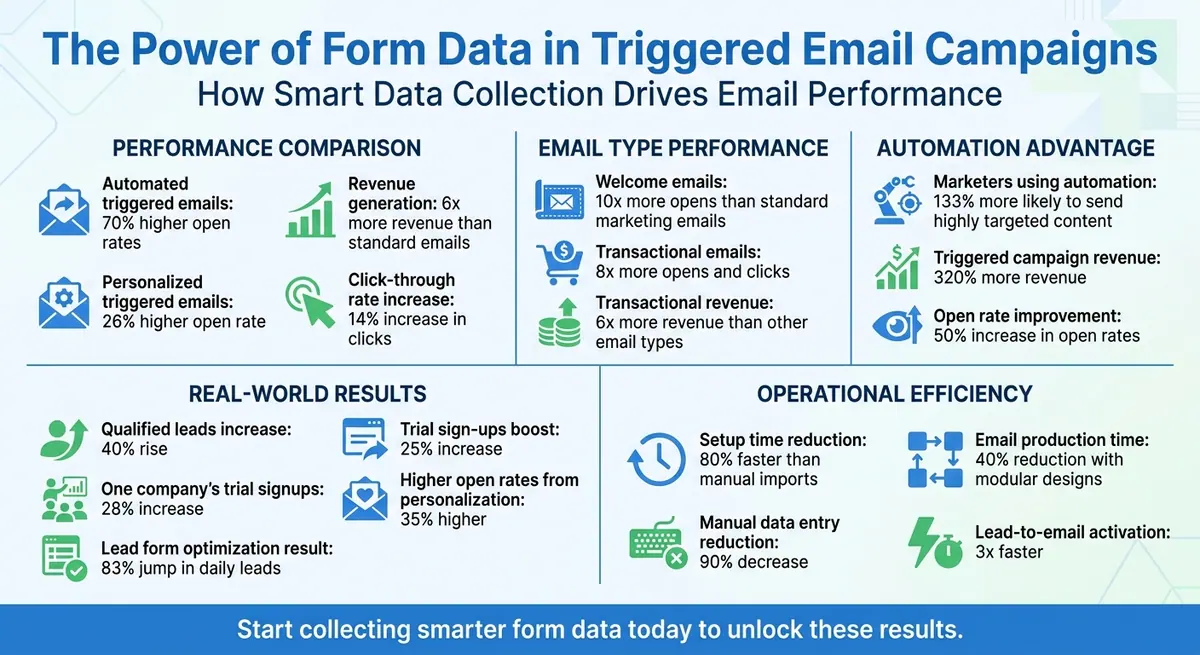
Triggered Email Campaign Performance Statistics and Impact Metrics
Multiple Trigger Automation: Sending Emails For a Variety of Events
sbb-itb-5f36581
Common Lead Engagement Problems
Even with access to detailed form data, many businesses still struggle to make their lead follow-up feel personal and relevant. The outcome? Lower open rates, weak engagement, and lost revenue opportunities. Recognizing these challenges is the first step toward creating email campaigns that truly resonate.
Why Generic Emails Don't Work
Generic email campaigns fail because they skip the critical Tailor Stage. When this step is ignored, trust and relevance take a hit. Instead of feeling understood, recipients are left to figure out if the message applies to them at all.
The stats back this up: Automated emails achieve nearly 70% higher open rates compared to generic, non-automated campaigns. Why? Because they focus on what matters to the recipient. On the other hand, design shortcuts - like using all-image emails - can hurt readability and make them less compatible with AI-based filtering.
"Every dollar saved can cost ten times more in lost conversions." – Tylor Loposser, Creative Director at Zeta
Another issue is how people consume content. Most subscribers skim rather than read word-for-word, so dense text blocks often fail to deliver the intended message. Accessibility problems, such as missing alt text or poor color contrast, further alienate audiences. This is especially critical when you consider that 1 billion people globally live with vision impairments.
Underutilized Form Data
Technical limitations and platform constraints often prevent businesses from fully leveraging form data. For example, personalization features that rely on data like traffic source often depend on cookie consent. If users decline cookies, workflows tied to that data can’t be triggered. This means a lead who clicked on a paid search ad for enterprise solutions might receive the same generic email as someone who downloaded a beginner’s guide.
Platform pricing is another roadblock. Advanced segmentation features are often locked behind premium subscription tiers. For instance, HubSpot Professional offers far more robust tools than its Free or Starter plans. Plus, pricing often scales with list size: a jump from $20/month for 500 contacts to $100/month for 5,000 contacts is common. These costs can discourage businesses from investing in segmented campaigns.
On top of that, creating accurate triggers can be a logistical headache. Businesses may need to build separate landing pages for each traffic source just to bypass tracking issues, which adds server strain and administrative complexity.
The irony is clear: marketers using automated emails are 133% more likely to send highly targeted content that aligns with subscriber interests. Yet, many businesses shy away from automation due to perceived costs or complexity. Using multi-step form design to simplify data collection and used can unlock the potential for precise, impactful email campaigns.
How to Collect and Structure Form Data for Email Triggers
Structuring form data effectively is the backbone of creating email triggers that resonate with your audience. The difference between an email that sparks engagement and one that gets ignored often lies in the data you collect and how you organize it. Well-designed forms set the stage for personalized and timely follow-ups that feel purposeful instead of random.
Form Fields That Drive Email Triggers
Start with the essentials: an email address and a name. These are non-negotiable for any triggered email sequence. Beyond this, additional fields help you understand user intent and provide context for your outreach.
For example, asking questions like "Which topics interest you?" or including dropdown menus for product categories allows you to craft highly targeted content. Welcome emails, which are often triggered by opt-ins, tend to perform exceptionally well - getting opened 10 times more often than standard marketing emails. Including fields like "Original Source" or UTM parameters can help you tailor follow-ups for users arriving via paid ads versus organic search. Behavioral data, such as pages viewed or items added to a cart, can further refine your email strategy using cookies or pixel tracking. Transactional and lifecycle events - like registration confirmations, purchase receipts, or password reset requests - are also powerful triggers. These types of emails generate 8 times more opens and clicks and drive 6 times the revenue of other email types.
If cookie consent poses a challenge, consider using dedicated forms or landing pages for specific campaigns. This foundational data collection paves the way for more advanced techniques, which we’ll explore next.
Using Conditional Logic to Gather Smarter Data
Conditional logic tailors forms dynamically, showing users only the questions that are relevant to them based on their previous answers. This makes the data you collect more precise and actionable. For instance, you might ask about company size only if the user selects "B2B."
This method helps pre-qualify leads. By using logic rules, you can filter and score responses, ensuring only high-quality data enters your email workflows. For example, if a user selects a budget range that doesn’t meet your criteria, they can be routed to a different email sequence or excluded from sales follow-ups altogether.
The results can be striking. One contact form saw an 83% jump in daily leads after refining its language and incorporating logic. Conditional logic can also trigger tailored confirmation emails. For instance, if someone identifies as a "Software Engineer" in a dropdown menu, they can be added to a role-specific drip campaign. Similarly, if they select "Other" for a pain point, a free-text field can appear, allowing for more personalized follow-ups. This adaptive approach can be further enhanced with interactive multi-step forms.
Why Multi-Step Forms Boost Data Collection
Multi-step forms break the process into smaller, more manageable sections, making it less overwhelming and increasing completion rates. Instead of presenting a long list of questions, breaking it into steps with 3–5 questions each helps users stay engaged. This format also works well with conditional logic, ensuring that each step only displays relevant questions based on earlier responses.
Segmenting forms into steps also makes it easier to identify where users drop off. Analytics can pinpoint which step causes the most abandonment, allowing you to adjust or reorder fields to improve completion rates. Additionally, multi-step forms simplify data mapping and deduplication when integrated with CRM or marketing automation tools. This ensures that clean, verified data flows seamlessly into your email sequences.
Features like lead enrichment, spam prevention, and email validation can further improve data quality. By ensuring that only accurate and verified information enters your system, you’ll reduce bounced emails, improve deliverability, and get more reliable performance metrics.
Connecting Reform with Email Automation Platforms
Once you've gathered structured form data, the next step is integrating it with your email automation tools. Reform makes this process effortless, offering seamless connections to platforms like HubSpot, Zapier, and ConvertKit. With just three clicks, you can set up real-time data transfers using no-code solutions. This ensures your form data immediately powers personalized email campaigns.
CRM and Marketing Tool Integration
Reform's integration with HubSpot allows enriched lead data - including names, emails, and custom fields - to flow directly into your CRM as soon as a form is submitted. For example, a multi-step signup form can capture user preferences, enrich the data with IP-based location details, and automatically create a HubSpot contact. From there, triggered emails can be sent based on the responses, cutting setup time by as much as 80% compared to manual imports.
Through Zapier, Reform connects to over 7,000 apps, including Mailchimp, ActiveCampaign, and Klaviyo. You can create "Zaps" to automate tasks like sending enriched lead data to specific email lists or routing high-value leads for priority follow-ups. This real-time syncing supports campaigns that handle thousands of leads daily, with data formatted specifically for U.S. audiences (e.g., MM/DD/YYYY).
With ConvertKit, Reform goes a step further by validating and enriching data through email verification. The data is then sent to ConvertKit as tagged contacts, triggering sequences like "Interest-based nurture" campaigns. These campaigns use dynamic content blocks informed by the form data. E-commerce businesses using this setup have seen 35% higher open rates thanks to personalization - all without requiring any coding. Beyond just data transfer, these no-code automation capabilities simplify workflows even further.
Setting Up Automation Without Code
Reform's dashboard makes it easy to set up integrations. With just a few clicks, you can authenticate your accounts, map form fields to your platform's properties, and test the setup with a sample submission before going live. Even marketers without technical skills can complete this process in under 15 minutes.
Always include an email field in your forms, as it serves as the key identifier for matching or creating contacts in your email platform. To ensure legitimate submissions aren't flagged as spam, authorize the Reform domain in your CRM settings. For more advanced workflows, Reform's conditional logic can route users through dynamic form paths, capturing data that can be segmented. For instance, "high-intent" responses can sync to HubSpot for more aggressive follow-ups, while others are sent to nurture sequences in ConvertKit. This approach has been shown to improve deliverability and engagement by 25%.
Reform users have reported impressive results, including lead-to-email activation happening three times faster. One SaaS company experienced a 28% increase in trial signups thanks to HubSpot-triggered sequences using multi-step form data. Zapier-powered workflows have reduced manual data entry by 90%. Additionally, real-time analytics track submission rates and conversion funnels, feeding valuable insights back into your email platform. This ensures every integration enhances both personalization and lead engagement.
How to Build and Improve Triggered Email Sequences
When your form data connects seamlessly to your email platform, you can create email sequences that align perfectly with user behavior. The simplest example is a form submission - when someone fills out your form, an email is sent immediately. But you can take it further. For instance, if a user selects "Enterprise plan" in a multi-step form, that choice can trigger a different sequence than the one for a "Starter plan." Other triggers include password reset requests, incomplete forms, or visits to sold-out product pages, each prompting tailored follow-ups. By combining structured form data with smooth integrations, you can refine your email sequences for more precise targeting.
"The easiest way to do this is to create a dedicated form with a dedicated landing page so that it's only used for your paid search ads. This allows you to trigger the workflow off of the form, and the page it was submitted on, preventing any non‐ad traffic from flowing through".
How to Configure Email Triggers
Start by clearly defining the user action that will activate each email sequence. Common triggers include submitting a form, making specific selections in multi-step forms, or requesting a password reset. These more detailed triggers allow for highly tailored email responses. Make sure the data mapping and conditional logic you set up earlier continue to ensure accuracy in triggering the right emails.
Avoid relying too much on source-based triggers like "Original Source" when tracking paid campaigns. These often depend on browser cookies, which may not work if users decline consent. Instead, use more reliable methods, such as page-specific data or unique form identifiers, to automate your workflows. Test each trigger with sample submissions to confirm that the data flows as expected.
Metrics That Show Campaign Performance
Focus on metrics that directly measure conversions. Keep an eye on open rates, click-through rates, and conversion rates to evaluate how effective your triggers are. Automated emails tend to perform better than standard campaigns, with 70% higher open rates and transactional emails generating six times more revenue than regular marketing emails. Welcome emails are another standout - they’re opened 10 times more often than other types of emails.
For campaigns triggered by forms, track metrics like the number of qualified leads and form abandonment rates. If users drop off at certain fields, they won't enter your email sequence. Tools like Reform offer real-time analytics to pinpoint exactly where users abandon forms, so you can adjust those fields to improve completion rates. Also, double-check the integrity of your data flow, particularly when using integrations like Zapier, to ensure that field mapping and conditional paths are routing data to your email platform correctly. These metrics provide the insights needed to fine-tune your campaigns on the fly.
Using Real-Time Analytics to Improve Results
Real-time analytics can help you identify and fix technical issues that might hurt your campaign's performance. They also confirm that your data collection and trigger configurations are working as intended. For example, if your emails rely heavily on image-based designs, AI summary features in Gmail or Apple Mail might not interpret them well, which could lower engagement rates. Real-time insights from Reform can track submission rates and conversion funnels, feeding valuable data back into your email platform. This lets you quickly address weak spots, whether it’s an underperforming subject line, unclear call-to-action, or a problematic form field causing drop-offs.
Switch to modular email designs instead of static templates. This can cut production time by up to 40% and make A/B testing faster. Follow the 60/40 rule - 60% visuals and 40% HTML text - to avoid deliverability issues and make your emails accessible for screen readers. For mobile optimization, use a minimum 16-pixel font size for body text and a 1.3 line height for better readability.
"What's important in inboxes is clear communication, not pixel-perfect rendering".
Focus on making your emails easy to skim. Start with the most important message and gradually move to supporting details. This inverted pyramid structure directs readers straight to your call-to-action, ensuring they don’t miss the key message.
Conclusion
Combining structured form data with triggered email campaigns tackles many of the challenges businesses face when trying to engage leads effectively. By using form data to create tailored, high-impact email sequences, you can address the specific needs of your audience. Tools like multi-step forms, conditional logic, and smart field designs allow you to gather detailed information, which in turn powers email triggers that feel personal rather than robotic. In fact, personalized triggered emails see a 26% higher open rate and a 14% increase in click-through rates compared to generic email blasts.
Reform makes this process straightforward, eliminating the need for developers or complex technical setups. Its no-code integrations with CRM and email platforms enable you to link form submissions to marketing automation workflows in no time. Features like real-time analytics, lead enrichment, and conditional routing ensure that your data flows smoothly, allowing you to focus on crafting impactful campaigns.
The results speak for themselves: triggered campaigns deliver 320% more revenue and see a 50% increase in open rates. One SaaS company experienced a 40% rise in qualified leads and a 25% boost in trial sign-ups by using multi-step forms to segment users based on their pain points and then tailoring email sequences accordingly.
To get started, focus on the basics: identify your most critical form fields, connect them to your email platform, and set up triggers based on user actions. Test your email sequences using real submissions and track metrics like conversion rates and form abandonment to refine your approach. Even something as simple as an immediate follow-up email to high-intent form submissions can lead to noticeable engagement improvements within days. Start using structured forms now to enhance both engagement and revenue.
FAQs
What form fields should I collect to trigger better emails?
To create more tailored and effective email campaigns, start by collecting essential details such as name, email, industry, company size, job title, and location. These fields allow you to craft targeted messages and segment your audience effectively.
You can take it a step further by incorporating behavioral data, like specific product interests or communication preferences. This additional layer of information helps refine your email triggers, ensuring they resonate with your audience.
Consider using multi-step forms or conditional logic in your data collection process. These tools let you gather more in-depth information over time, making follow-up emails even more relevant to your customers' needs and actions.
How can I personalize emails without relying on cookies?
When it comes to personalizing emails, you don’t need to rely on cookies. Instead, you can use data collected directly from forms. For example, multi-step forms can capture details like industry, company size, or job title, which can then be used to trigger customized email workflows.
To take it a step further, real-time lead enrichment can add verified information - such as company revenue or contact details - to your database. This allows you to create highly targeted emails that feel personal and relevant. The best part? This method respects user privacy while still delivering tailored communication.
How do I set up form-to-email triggers in Reform?
To configure form-to-email triggers in Reform, you can use the Email Automation feature. This allows you to send tailored emails based on form submissions.
- Step 1: Open your form and navigate to the Integrations section.
- Step 2: Click on Add integration under the Email Automation option.
- Step 3: Use Liquid syntax to customize the email's address, subject line, or message body with form responses. This setup streamlines follow-ups and boosts engagement with your audience.
Related Blog Posts
Get new content delivered straight to your inbox

The Response
Updates on the Reform platform, insights on optimizing conversion rates, and tips to craft forms that convert.




Drive real results with form optimizations
Tested across hundreds of experiments, our strategies deliver a 215% lift in qualified leads for B2B and SaaS companies.
