

How to Track Multiple CTAs Through Form Submissions



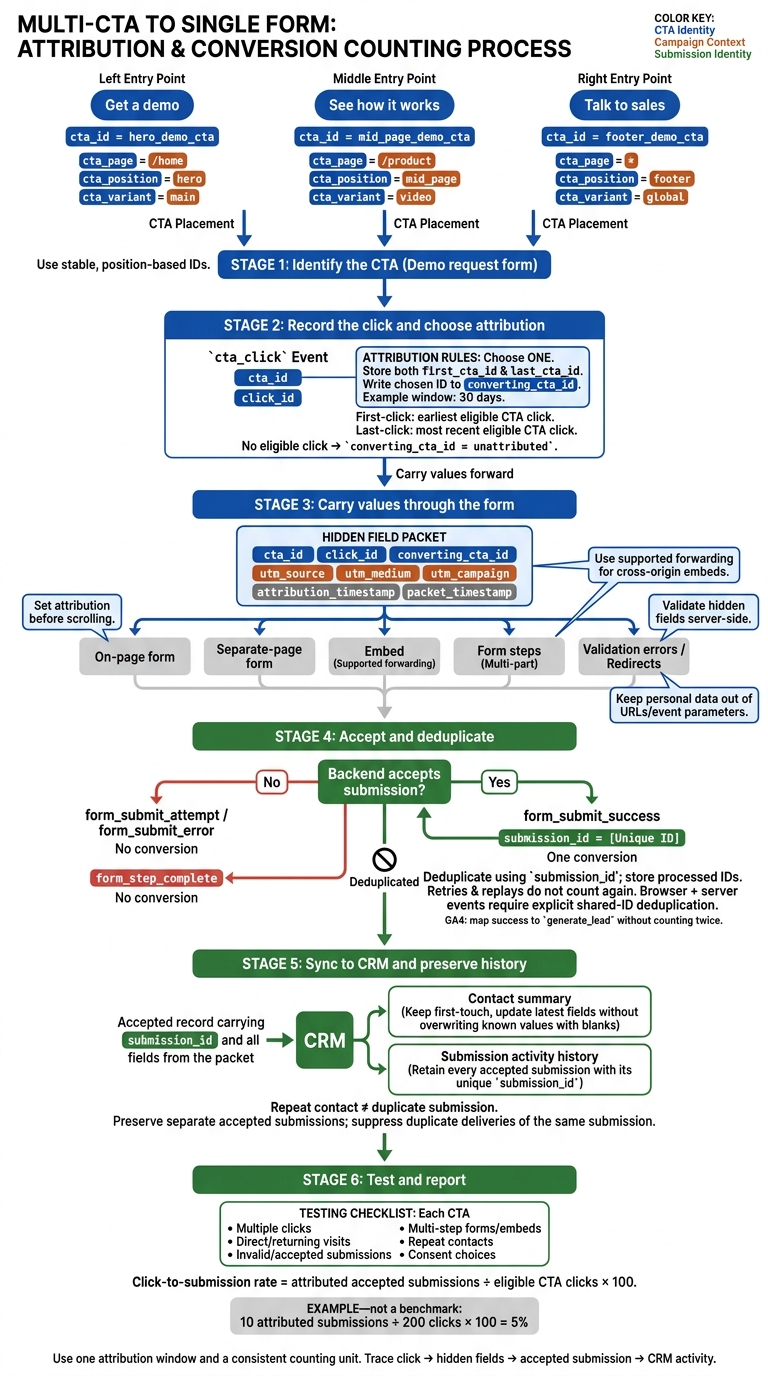
To track which CTA generated a lead, pass its ID from the click into a hidden form field, then save it with the accepted submission and CRM record. For example, hero_demo_cta identifies the page placement - not just the form someone completed.
Keep the tracking rules simple:
- Choose first-click or last-click credit, with a set window, such as 30 days.
- Carry CTA and campaign fields through every form step, including embeds and redirects.
- Count only accepted submissions, using a submission ID to prevent duplicate conversions.
- Keep submission history in the CRM without overwriting first-touch data.
- Test each path, including repeat visits, missing data, and consent choices.
Then compare accepted submissions with eligible clicks for each CTA. For example, 10 attributed submissions from 200 clicks equals a 5% click-to-submission rate.
CTA Tracking: From Click to CRM
Plan CTA IDs and Attribution Rules
Assign a Stable ID to Each CTA Position
Use lowercase, position-based IDs such as
hero_demo_cta,mid_page_demo_cta, andfooter_demo_cta.
Don’t base IDs on temporary copy, styling, or button order. Those details can become unclear after a redesign. Give each placement its own ID and keep it consistent across variants. Store cta_page, cta_position, and cta_variant separately so reports can group results by any of these fields.
Use cta_click only for button clicks, form_start for the first form interaction, and form_submit for accepted submissions. Plan hidden fields for CTA details and timestamps, along with first_cta_id, last_cta_id, converting_cta_id, and attribution_status.
CTA location Visible label Identifier Destination form CRM property Hero section Get a demo hero_demo_ctaDemo request form converting_cta_idMid-page section See how it works mid_page_demo_ctaDemo request form converting_cta_idFooter Talk to sales footer_demo_ctaDemo request form converting_cta_id
Choose First-Click or Last-Click Attribution
First-click credits the earliest eligible CTA click. Last-click credits the most recent eligible CTA click before an accepted submission. Store both IDs, but write only the chosen one to converting_cta_id. Update last_cta_id with each eligible click, keep first_cta_id unchanged, and count only one conversion per submission.
For these rules to work, the same CTA ID must carry through every form step.
Set a clear attribution window, such as 30 days before submission. Document how you’ll store the data and whether campaign changes reset that window. Keep eligible clicks for returning visitors, but don’t credit expired clicks. Only credit clicks that reach the intended form, excluding bots, tests, and unrelated forms.
Keep source and campaign fields separate from CTA fields. For direct form visits, set converting_cta_id to unattributed unless an eligible CTA click is already stored. Use the same fallback when tracking is blocked or click data is missing. Don’t guess which button deserves credit.
Next, pass the chosen CTA ID and campaign data into hidden form fields.
sbb-itb-5f36581
Pass CTA and Source Data to the Form
Collect CTA IDs and Campaign Parameters
Read cta_id from the clicked button’s data attribute. Write that same value to both the click event and the hidden field.
If the form lives on a separate page, pass cta_id as an allowlisted URL parameter, then fill the hidden field when the page loads. Follow the same pattern for scroll-to-form buttons and embedded forms.
Map utm_* values to dedicated fields. Treat landing-page and referrer URLs as context, not proof of source. Remove personal data, access tokens, and other sensitive query parameters from URLs.
Fill Hidden Fields and Keep Values Across Steps
For buttons that scroll to an on-page form, set attribution in the click handler before scrolling. Use one handler for mouse, keyboard, and touch activation.
For cross-origin embeds, use supported parameter forwarding, embed settings, or approved messaging. Don’t assume code on the parent page can edit the embedded form directly.
Keep attribution intact through form steps, validation errors, and redirects using built-in state handling or first-party storage. Apply the same overwrite rules throughout, then map the values to the form builder’s hidden fields.
Validate hidden fields server-side. Never use them for authorization, pricing, or routing.
Set Up Attribution Fields in Reform
In Reform, map the same hidden attribution fields to each form type. Reform fills hidden fields from URL query parameters using the hidden-field name or field ID. Your site code still needs to record scroll-button clicks and forward those values dynamically.
For custom HTML or headless forms, get the snippet from Share → Headless. Copy each block ID from settings, then map inputs as answers[<block-id>].
Check a submitted test record to confirm that its CTA and source values match the click data. If you use headless mode, check that it works with the integrations you need.
How to Track Form Submissions on Google Ads With Google Tag Manager
Track CTA Clicks and Accepted Submissions
Once the form carries the CTA ID, record the click and the accepted submission as separate events.
Set Click and Submission Event Triggers
Fire cta_click when someone presses the button, and fire form_submit_success only after the backend accepts the submission. Use the same field names across browser, server, and CRM events.
Store the event-level click_id alongside the hidden-field cta_id so you can trace the accepted submission_id back to the exact click. Include any available utm_source, utm_medium, utm_campaign, and utm_content values.
| Event name | Trigger | Required parameters | Expected outcome |
|---|---|---|---|
cta_click |
Visitor activates a tracked CTA | cta_id, click_id, position, page, destination |
Records origin |
form_submit_attempt |
Visitor attempts final submission | form_id, validation_status |
Attempt; no conversion |
form_step_complete |
Visitor completes a valid multi-step form step | form_id, step_number |
Progress; no conversion |
form_submit_error |
Form system rejects the submission | form_id, error_type |
Failure; no conversion |
form_submit_success |
Backend confirms acceptance | form_id, submission_id, cta_id, click_id when available |
One conversion |
Count only backend-confirmed success as a conversion. In GA4, map that event to generate_lead without counting it twice.
Match Records and Remove Duplicate Events
Group records by cta_id. To match a submission to its click, carry a separate click_id into the form record and link it to submission_id. Use your chosen first-click or last-click rule to decide which click ID to keep.
Use submission_id as the deduplication key for each accepted submission. Send the success event once, and store processed IDs so retries and replays don't count again.
If both browser and server tracking send events, set up explicit deduplication using the shared ID. Adding the parameter alone won't prevent duplicate conversions.
Keep personal data out of event parameters and URLs.
Send CTA and Source Data to the CRM
Once a submission is accepted and deduplicated, sync the same cta_id, campaign data, and submission_id to the CRM.
Map Form Fields to CRM Properties
Create dedicated CRM properties for cta_id, cta_position, utm_source, utm_medium, utm_campaign, utm_term, utm_content, landing_page_url, referrer_url, submission_id, and submission_timestamp. Map each field through your CRM integration or webhook.
Store only the page path and approved parameters. Allow a blank referrer, use UTC for timestamps, and keep source values in consistent casing.
In Reform, verify the destination CRM and field mappings before launch. Compare the values in Reform’s Responses tab with the actual CRM contact and submission record. A successful connection isn’t enough. Test hidden fields, optional blanks, conditional paths, and multi-step submissions, too.
Keep Attribution History for Repeat Contacts
Use CRM contact properties for attribution summaries and the activity log for the full submission trail.
Keep first-touch fields unchanged. Update latest fields with each accepted submission, but ignore blank hidden fields so they don’t erase known attribution. Apply these rules to first_cta_id, first_utm_source, related first-touch properties, latest_cta_id, latest campaign properties, and latest_submission_timestamp. Let prefilled values update latest fields only when they describe the current submission.
Store every accepted submission as a linked activity with its submission ID, CTA, campaign values, page, referrer, and timestamp. Contact properties hold the first/latest summaries; the linked activity log serves as the source of truth for CTA conversion history.
Test Tracking and Report by CTA Position
After CRM sync, check the attribution path from the first click to the linked CRM record.
Test Each CTA From Click to CRM
Before reporting by CTA position, inspect hidden values, the submitted payload, success events, and the linked CRM record.
- Individual and multiple clicks: Test each CTA on its own, then click two CTAs before submitting. Confirm that the stored
cta_idfollows your chosen attribution rule across the click, payload, and CRM. - Direct and returning visits: Direct visits should store no CTA value unless a prior tracked click still qualifies. Return after a tracked click to check that stored values expire or update as intended, without keeping stale campaign data.
- Invalid and successful submissions: Invalid attempts must not fire success events. Each accepted submission should create one success event and one CRM record. For Reform headless forms, match input types to block types and use browser validation to catch errors before users reach a hosted error page.
- Multi-step and embedded forms: Test every page, redirect, and iframe boundary to confirm that attribution stays intact.
- Repeat contacts and consent choices: Submit again as an existing contact. Verify that this adds one new submission activity without changing first-touch data, then repeat the test with consent declined.
For Reform headless forms, also check that each hidden field maps to the correct block ID.
Calculate Conversion Rates by CTA Position
Once the path passes testing, group results by cta_id. Then segment by page, device, campaign, and date range.
Click-to-submission rate = attributed accepted submissions ÷ eligible CTA clicks × 100.
Use one attribution window and one counting unit. For event-based rates, use deduplicated clicks. For person-based rates, use unique clickers and converters. Define whether repeat submissions count, and give every click cohort the same conversion window.
Find Missing or Mismatched Attribution
Use these records to trace missing IDs and campaign values from the CRM back to the payload and click.
A value in the payload but not in the CRM points to a mapping or sync problem. A value missing from the payload points to a capture, persistence, or redirect issue.
Check duplicate records separately. Clicks without submissions may mean users abandoned the form - not that tracking failed. Document consent gaps, blocked analytics, and browser restrictions alongside your reporting rules. Compare accepted-submission records with deduplicated success events, rather than comparing contact totals.
Conclusion: Keep CTA Tracking Connected
Stable CTA IDs, hidden fields, and CRM mapping keep click-to-submission attribution intact.
Run these checks before every release and after any page, form, URL, or integration change.
- CTA tests: Trace every button through its hidden field to the CRM record.
- Source and position: Check that CTA IDs and campaign values carry through every step and redirect, and that each position maps to the correct ID.
- Deduplication: Confirm that repeat submissions update the existing contact instead of creating a duplicate.
FAQs
Can I track CTA clicks across devices?
Yes. Connect your analytics and form tracking, then pass stable identifiers between your email platform, website, and CRM. These identifiers help tie CTA clicks to the same user record across devices.
Check that tracking scripts work correctly across your web pages and that Reform form completions sync to your CRM. This keeps the user journey consistent across your tools.
How can I fairly compare CTAs with different visibility?
Compare CTA exposure rates - the percentage of users who see each CTA - and click-through rates based on those exposed. Run A/B tests with a clear hypothesis, changing only position or visibility so you can isolate its effect. Test each variation with at least 1,000 recipients over 3–7 days.
Keep tracking data in one place, use consistent naming, and maintain clean attribution. Give each cohort the same follow-up window so you can compare results on equal terms.
How do I link CTA attribution to CRM revenue?
Use hidden form fields to collect UTM parameters such as utm_source, utm_medium, and utm_campaign. Map each field to its matching lead-source property in your CRM so every submission includes its source data.
To connect engagement to revenue, pass a stable campaign or workflow ID alongside the CRM contact ID. Then set up your CRM to link these source identifiers to closed-won deal values for revenue-based ROI reporting.
Related Blog Posts
Get new content delivered straight to your inbox

The Response
Updates on the Reform platform, insights on optimizing conversion rates, and tips to craft forms that convert.



Drive real results with form optimizations
Tested across hundreds of experiments, our strategies deliver a 215% lift in qualified leads for B2B and SaaS companies.
