
.webp)
Real-Time vs. Scheduled Sync: Pros and Cons



If timing affects lead follow-up, triggered emails, or opt-outs, I’d use real-time sync. If a short delay is fine, I’d use scheduled sync to keep cost and setup work lower.
Here’s the short version:
- Real-time sync moves changes in seconds
- Scheduled sync moves changes every 5, 15, 60 minutes, or on a daily run
- Real-time fits demo requests, trial starts, upgrades, payment issues, and unsubscribes
- Scheduled fits reporting, list cleanup, deduping, and bulk updates
- Real-time gives faster action, but needs more API handling and integrations, retries, and failure controls
- Scheduled is simpler to run, but stale data can hurt routing, timing, and campaign accuracy
- For many B2B teams, a hybrid setup works best: real-time for high-urgency events, batch for cleanup and reporting
In other words: use speed where delay costs you money or creates compliance risk. Use batches where delay changes little.
Quick Comparison
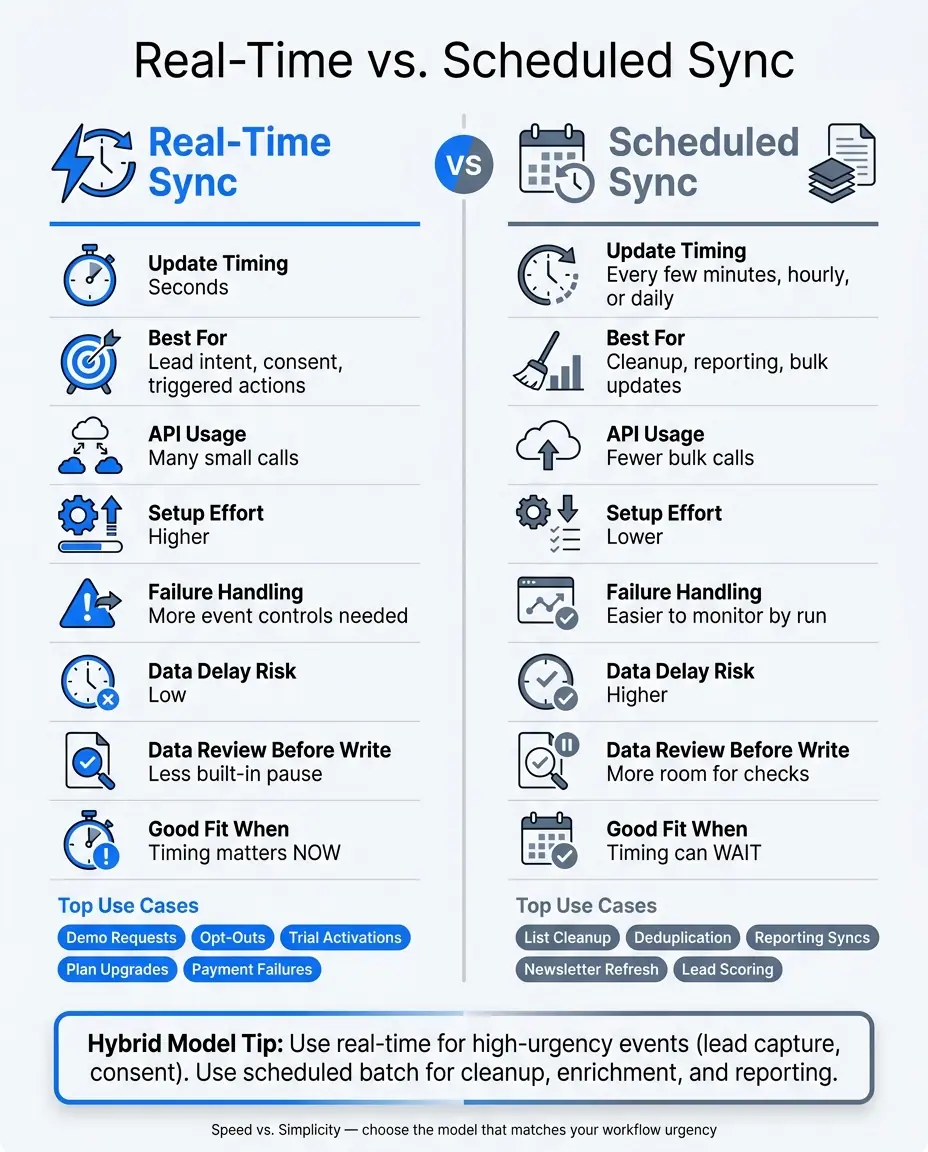
Real-Time vs. Scheduled Sync: Side-by-Side Comparison
| Criteria | Real-Time Sync | Scheduled Sync |
|---|---|---|
| Update timing | Seconds | Every few minutes, hourly, or daily |
| Best for | Lead intent, consent, triggered actions | Cleanup, reporting, bulk updates |
| API usage | Many small calls | Fewer bulk calls |
| Setup effort | Higher | Lower |
| Failure handling | More event controls needed | Easier to monitor by run |
| Data delay risk | Low | Higher |
| Data review before write | Less built-in pause | More room for checks |
| Good fit when | Timing matters now | Timing can wait |
One simple question can guide the choice: what happens if this data arrives in 5 seconds versus 24 hours? If the answer is “lost lead,” “late follow-up,” or “opt-out risk,” I’d lean real-time. If the answer is “not much,” scheduled sync is usually enough.
sbb-itb-5f36581
Real-Time Sync: Pros, Cons, and Requirements
Real-time sync sends updates right away, so high-converting form submissions, consent changes, and lifecycle events land in CRM and email tools without a wait. It usually runs through webhooks or event streams. That kind of speed matters most when timing affects conversion, compliance, or fast follow-up.
Where Real-Time Sync Works Best
Real-time sync fits moments where a delay can cause problems, including:
- demo requests
- opt-outs
- trial activations
- plan upgrades
- payment failures
Main Benefits of Real-Time Sync
Teams work from the current record, which helps keep routing, segmentation, and triggered emails in line with what just happened. In plain English: the system reacts while the moment still matters.
That said, speed isn't free. It adds more work behind the scenes.
Main Drawbacks of Real-Time Sync
Real-time sync puts more pressure on APIs because it sends lots of small API calls and needs stronger retry logic. You also need idempotency keys to stop duplicate records, plus dead-letter queues to catch events that fail to process.
The bigger issue is tight coupling. When one system slows down or goes offline, that failure can spread across connected tools.
If two systems can update the same field, set one conflict rule ahead of time - like last write wins or system of record wins. If that sounds like a lot, that's because it can be. When the cost and complexity are higher than the need for instant updates, scheduled sync is often the simpler choice.
Scheduled Sync: Pros, Cons, and Best-Fit Scenarios
When you don't need updates the second they happen, scheduled sync gives teams a simpler, steadier way to run things. Instead of moving each change right away, it pushes data in batches on a set schedule - every 15 minutes, every hour, or once a day. That means your CRM and email platform stay in sync, just with a delay.
Where Scheduled Sync Makes Sense
Scheduled sync works best when a short delay won't hurt the workflow. Good examples include nightly list cleanup, bulk contact updates, lead scoring recalculations, reporting syncs, and newsletter list refreshes.
This setup also fits teams that work on a set reporting rhythm. In that case, a complete dataset from the prior day can be more useful than a stream of partial live changes. You're not chasing moving numbers. You're looking at one clean snapshot.
Main Benefits of Scheduled Sync
The biggest plus is predictability. Batch jobs can run during off-peak hours, use fewer API calls, and cut operating costs. For many teams, that's a plain and practical win.
There's another upside too: batch processing gives you a built-in checkpoint before data lands in the other system. That makes it easier to validate records, remove duplicates, and clean up bad data before anything gets committed.
"Batch integration creates a natural checkpoint. The entire batch can be validated and cleansed before it's committed, making it substantially more suitable for quality assurance on large datasets." - Boomi
Main Drawbacks of Scheduled Sync
The downside is latency. Between sync runs, data can get old, and teams may make decisions based on information that's several hours - or even a full day - behind. For time-sensitive work, that's a real problem.
Longer batch jobs also need oversight. If a run fails or slows down, someone still has to monitor it and handle retries. And if a nightly sync feels too slow, mini-batching every 5 to 15 minutes can offer a middle ground.
Next, compare how each model affects personalization, compliance, and common B2B workflows.
Real-Time vs. Scheduled Sync: Direct Comparison for CRM and Email Workflows
The biggest gaps come down to triggers, consent, and who owns the data.
How Each Method Affects Personalization and Triggered Campaigns
If someone submits a demo request form, real-time sync can send that lead into your CRM within seconds. That speed matters. Sales can act while the person is still paying attention.
With scheduled sync, the timing changes. A lead that comes in during the morning might not move over until the next planned run. That delay can throw off follow-ups, routing, and campaign timing.
Real-time sync keeps personalization and audience segmentation tied to the latest user activity. Scheduled sync works better for batch segmentation, especially when there’s no need to act right away.
How Each Method Handles Compliance and Data Governance
Consent and unsubscribe updates are where real-time sync matters most. If someone opts out, that update should move across your systems right away to cut compliance risk.
There’s a tradeoff, though. Real-time sync needs tighter validation because bad data moves fast. One wrong field mapping or malformed record can spread at once, which is why integrating with your favorite tools requires a reliable sync strategy.
Batch sync gives teams a built-in checkpoint. Records can be validated and cleaned before they’re committed, which gives data teams more control over what enters the system.
Define the CRM as the source of truth for lead status.
Use Case Matrix: Which Sync Model Fits Common B2B Scenarios
Use the table below to match sync speed to workflow urgency.
| Scenario | Recommended Model | Why |
|---|---|---|
| Demo requests | Real-time | Immediate lead routing |
| Content downloads | Real-time | Instant asset delivery |
| Webinar signups | Near-real-time | Timely confirmation |
| Lead scoring updates | Near-real-time | Supports timely sales alerts |
| Consent / unsubscribe | Real-time | Prevents stale opt-outs |
| Newsletter list refresh | Scheduled | Low urgency |
| Deduplication and cleanup | Scheduled | Needs full dataset |
| Marketing analytics | Scheduled | Daily summaries are enough |
A simple rule of thumb: use real-time for intent and consent. Use scheduled sync for cleanup, reporting, and low-urgency lists.
How to Choose the Right Sync Model
Once you’ve looked at speed, cost, and control, the next step is pretty simple: pick the model that fits the workflow in front of you. The best sync model should match how the business works, not just what the tech stack can do. At the heart of it, this comes down to one tradeoff: speed versus day-to-day simplicity.
Questions to Ask Before You Decide
Start with one question: what's the business impact if this data arrives in 5 seconds versus 24 hours?
That question cuts through a lot of noise. If the answer is a lost lead, a slow follow-up, or a compliance issue, real-time sync is probably the right move. If the honest answer is “not much,” batch sync will usually do the job.
Then look at each workflow through four lenses:
- Freshness requirement - how up to date does the data need to be?
- Business impact of stale data - what goes wrong if the sync is delayed?
- Implementation complexity - does your team have the time and skill to maintain event-driven infrastructure?
- API limits - real-time is API-heavy; batch makes better use of bulk endpoints
There’s also the upkeep factor. Real-time systems need more monitoring and more maintenance. Batch systems are easier to run, and when something breaks, they’re usually easier to fix.
When a Hybrid Model Is the Better Choice
For a lot of teams, the answer isn’t all real-time or all batch. It’s a mix.
A hybrid model often works best: use real-time for lead capture, then use batch for lead qualification or cleanup.
And if full real-time feels like more work than it’s worth, there’s a middle path. Syncing every 5 to 15 minutes can give you near-real-time data without the demands of a fully event-driven setup. Mini-batching makes sense when a nightly run is too slow, but always-on event streaming feels like overkill.
Key Takeaways
Use these rules to pick your default, then make exceptions for workflows where timing matters more.
- Real-time sync makes sense when speed has a direct effect on compliance or follow-up.
- Scheduled sync makes sense when data quality and API efficiency matter more than raw speed.
- A hybrid model is a good fit for most B2B setups - use real-time where it matters, not everywhere.
- If you’re unsure, start with batch to build a stable baseline, then add real-time triggers only where the business case is clear.
FAQs
How do I choose the right sync method?
Pick the sync method based on your business goals, how much data you move, and how much data freshness matters.
If even a small delay could break a workflow or cost you a sale, go with real-time sync.
If you don't need updates right away, batch sync is often simpler and more efficient. A lot of teams end up using both: real-time for time-sensitive, customer-facing events, and batch for heavier work that can wait.
When is a hybrid sync model best?
A hybrid sync model tends to work best for organizations operating in mixed environments that need fast response times and large-scale data processing.
Here’s the idea: use real-time sync for critical, time-sensitive events, and use scheduled batch processing for heavy data sets, reporting, and bulk reconciliation.
That split does two things at once. It helps teams keep customer experiences smooth and dependable, while also keeping infrastructure costs under control and easing pressure on core systems.
What can go wrong with stale data?
Stale data slows teams down and chips away at trust. Sales reps can end up chasing dead leads. Leaders can make calls based on numbers that don't reflect what's happening. And when customer-facing experiences show the wrong info, users start to lose confidence.
Disconnected systems make the problem worse. Marketing, HR, and finance each see only part of the picture, which leads to delays, admin headaches, inventory gaps, missed chances, costly rework, and frustrated teams.
Related Blog Posts
Get new content delivered straight to your inbox

The Response
Updates on the Reform platform, insights on optimizing conversion rates, and tips to craft forms that convert.




Drive real results with form optimizations
Tested across hundreds of experiments, our strategies deliver a 215% lift in qualified leads for B2B and SaaS companies.
